
The App Configurator opens from My Apps with the gear button. It has seven tabs: General, Splash Screen, Cabin Layout, Area Call Panel, Announcements, Background Music and Hardware (the last one with the hardware add-on; see the Kiosk mode and hardware guide).
Changes are saved with Save configuration and apply the next time you load the trainer. The configuration name is the exception: it saves automatically when you leave the field.
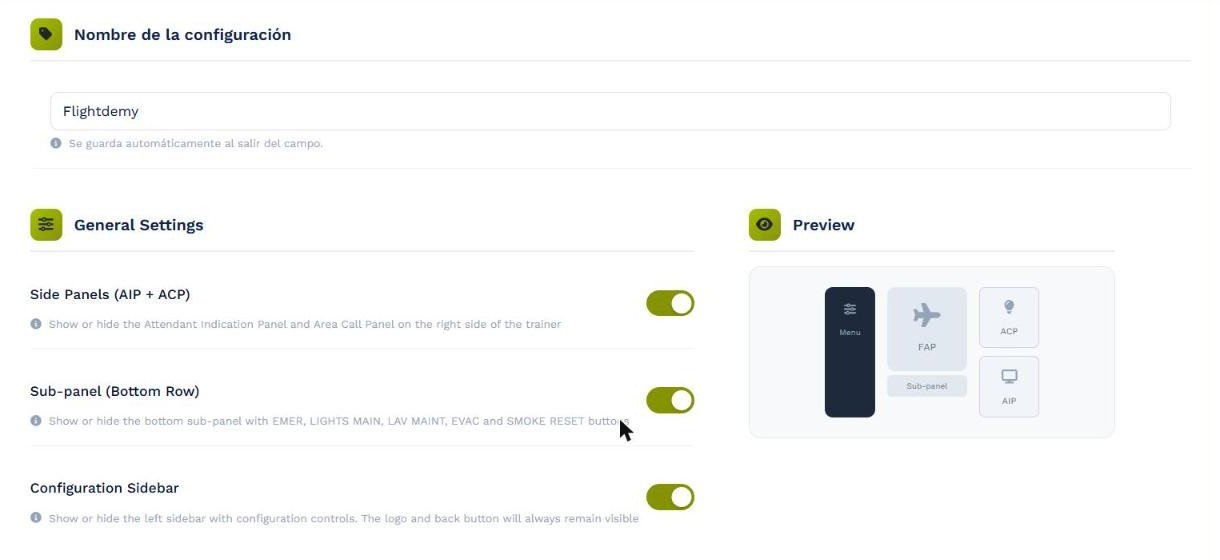
The General tab: each switch updates the preview on the right.
Side Panels (AIP + ACP)
Shows or hides the AIP and ACP to the right of the FAP. On a small simulator screen, hiding them gives the FAP more room.
Sub-panel (Bottom Row)
Shows or hides the row of buttons under the FAP (EMER, LIGHTS MAIN, LAV MAINT, EVAC and SMOKE RESET). Hide it if your physical cabin already has these controls.
Configuration Sidebar
Shows or hides the app configuration sidebar. The logo and back button remain visible even when it is hidden.