
On the left of the app is the Configuration sidebar, where you set up training scenarios while using the FAP. Tap a section name to expand it. If you do not see it, check that Configuration Sidebar is enabled in the Configurator.
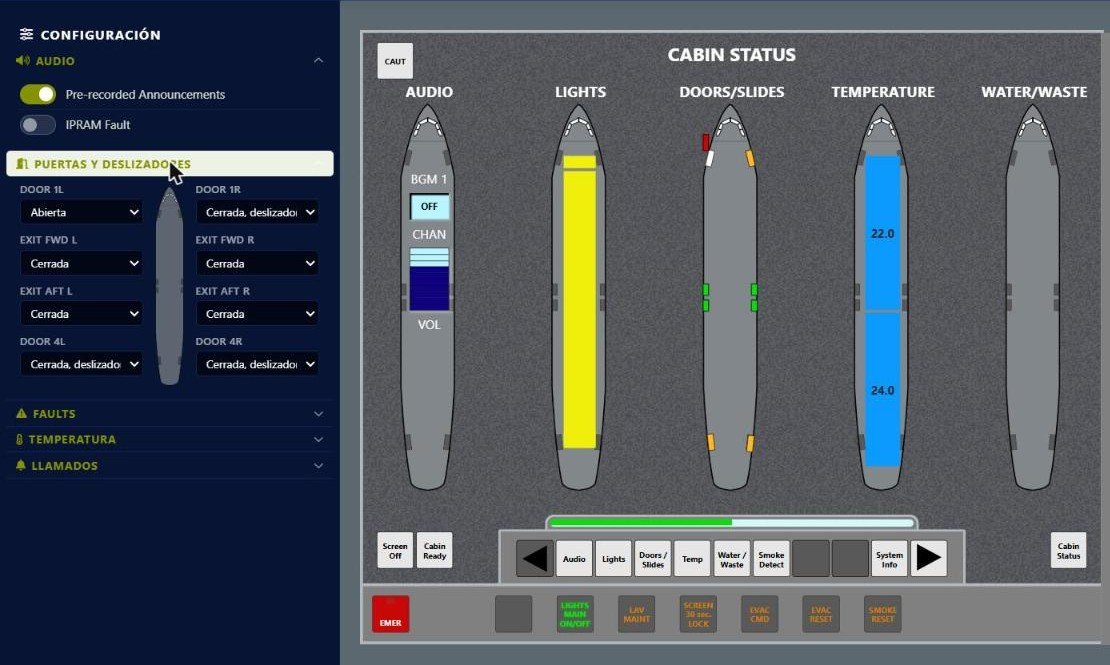
The Audio and Doors/Slides sections expanded.
Audio
- Pre-recorded Announcements: shows or hides the pre-recorded announcements module on the FAP Audio page.
- IPRAM Fault: simulates removing the IPRAM card, which disables pre-recorded announcements. When you turn it off, the system simulates a reboot and the module takes a few seconds to become available again.
Doors and slides
Each door has its own drop-down. The four main doors (1L, 1R, 4L and 4R) can be Open, Closed, slide disarmed or Closed, slide armed; the emergency exits (FWD and AFT, each side) can be Open or Closed. The change shows instantly on the Doors/Slides page and on Cabin Status.
Calls
Simulate Passenger Call, Lavatory A Call, ATTD CALL and Emergency Call; the EVAC CMD button triggers the evacuation command with its alarm. Each call lights its color on the ACP, appears on the AIP and shows the matching indication on the FAP.