Are you curious about the Flight Attendant Panel (FAP) found on Airbus 320 aircraft? Look no further! In this comprehensive guide, we'll unveil the mysteries behind the FAP and provide you with a detailed understanding of its functionalities and operation. Whether you're a flight attendant, aviation enthusiast, or simply interested in aircraft systems, this article will enlighten you about the inner workings of the FAP.

What is the Flight Attendant Panel (FAP)?
The Flight Attendant Panel (FAP) serves as the central control hub for managing and monitoring various cabin systems on Airbus 320 aircraft. It enables flight attendants to efficiently control lighting, emergency systems, lavatory functions, and more. Let's dive deeper into the components that make up the FAP.
The Components of the FAP
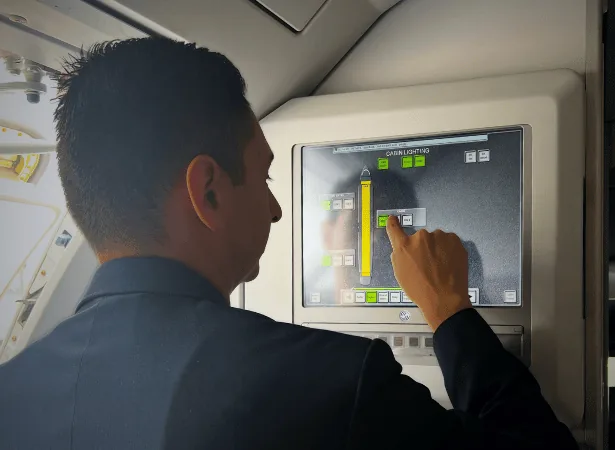
The FAP consists of two main parts: the touch screen and the sub-panel. The touch screen, divided into the heading row, display area, and system and function keys, allows flight attendants to select and view system pages. On the other hand, the sub-panel features hard keys for major functions that operate independently from the touch screen.

Ready to Master the A320 FAP?
Join Our Course Now and Elevate Your Cabin Crew Skills! Gain comprehensive expertise in the FAP of the Airbus A320 family and dive deep into the intricacies of the FAP Pages.
Register now!
Exploring the Touch Screen
Delve into the touch screen's functionalities, including selecting system pages, viewing cabin status, and accessing important information. Learn how to navigate through the touch screen interface and make the most of its user-friendly features.
Discover the system pages available on the FAP and their significance. From cabin lighting and emergency systems to lavatory controls and evacuation alerts, each system page provides flight attendants with valuable insights and control over specific cabin functionalities.
The FAP system pages, one by one
Each page of the touch screen controls a different cabin system. These are the ones cabin crew use most often:
Doors
Shows the status of every passenger door and emergency exit: open, closed, and whether its slide is armed or disarmed. Cabin crew rely on this page for the arming and disarming cross-check before departure and after arrival.
Lights
Controls cabin lighting by zone, such as the entrance areas and the passenger cabin, with different brightness levels. It is used to set bright light for boarding, dim the cabin for takeoff and landing, and create a comfortable setting on night flights.
Audio
Manages boarding music and pre-recorded announcements. Crew can select an announcement and play it over the passenger address system, which keeps safety and service messages consistent on every flight.
Temperature
Displays the temperature of each cabin zone and lets the crew fine-tune it within the range allowed by the flight crew, so passengers in the front and rear of the cabin stay comfortable.
Water / Waste
Shows potable water quantity and waste tank levels. Crew check it during preflight and turnaround to make sure there is enough water and the waste tanks have been serviced.
Smoke
Alerts the crew when a lavatory smoke detector is triggered and identifies which lavatory it is, so they can respond immediately following the smoke and fire procedures.
Faults (CIDS)
Lists Cabin Intercommunication Data System messages and malfunctions. Knowing how to read them helps the crew report problems correctly to the flight crew and maintenance.
How cabin crew use the FAP during a flight
The FAP is part of almost every phase of the flight:
- Boarding: Bright cabin lights, boarding music and a quick look at the Doors page.
- Before departure: Slides armed, cross-check confirmed on the Doors page, cabin dimmed for takeoff.
- Cruise: Temperature adjustments, lighting for service or rest, and attention to any smoke or fault alert.
- Arrival: Slides disarmed and checked on the Doors page before any door is opened.
- Turnaround: Water and waste levels checked so the aircraft is ready for the next flight.
Related panels: AIP and ACP
The FAP works together with two smaller panels. The Attendant Indication Panel (AIP) is a display at each attendant station that shows calls and alerts for that position. The Area Call Panel (ACP) uses coloured lights in the cabin ceiling to show the type of call and where it comes from. Learn more in our guide A320 AIP Explained.
Practice with the A320 FAP Trainer
Use every FAP page in an interactive simulator: doors and slides, lights, audio, temperature, smoke alerts and CIDS faults, right from your browser.
Try the simulator for freeFrequently asked questions
Is the FAP the same on every A320?
The layout and main pages are standard across the A320 family, but each airline can configure options such as announcements, music and some cabin settings, so details may vary between operators.
Can I practice with the FAP without being on an aircraft?
Yes. A FAP simulator reproduces the panel pages and alerts so cabin crew and students can practice procedures from a computer or tablet before training on the real aircraft.
What is the difference between the FAP and the AIP?
The FAP is the main control panel, usually at the forward attendant station. The AIP is a smaller display at each attendant station that shows calls and alerts relevant to that position.